What they are
Every time materials go out to a job, or a job's output comes back, PrixERP records a document:
- Issue Products (WO) lists the WOI documents: materials issued to jobs.
- Receive Products (WO) lists the WOR documents: goods received from jobs.
Most of these are made for you on the work order page, when you issue or receive. See Issue and receive. These two screens are the registers of them: use them to find a document and look at it, across all orders.
The list
Open Manufacturing Activity Control, then Issue Products (WO) or Receive Products (WO).
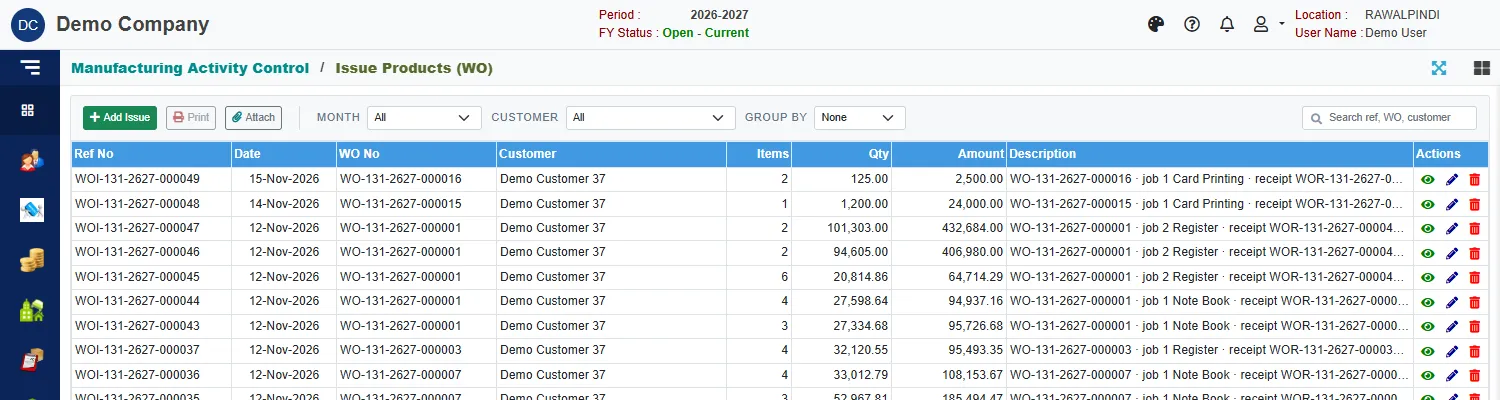
Each row shows:
| Column | Meaning |
|---|---|
| Ref No | The document number, for example WOI-131-2627-000049. |
| Date | The date of the issue or receipt. |
| WO No | The work order it belongs to. |
| Customer | The order's customer. |
| Items, Qty, Amount | How many items, the total quantity and the value. |
| Description | Says which job it was made for and the document it is paired with, for example job 1 Card Printing · receipt WOR-131-2627-000049. |
Use Month, Customer and Group by to narrow or group the list, and the search box to find a number or an order. Select a row and click Print to print it, or Attach to attach files.
Reverse a document
The work order page is the best place to reverse a document: its Documents card has a reverse button beside each one, and asks you to confirm. Reversing an issue puts its stock back. Reversing a receipt reverses its stock and its accounting voucher.
Add an issue by hand
Add Issue and Add Receive open a plain form: Ref No, Ref Date, a Description, and a List of Products where Add Row adds a product with its quantity. Use the work order page instead for ordinary work: it knows the job, the contractor and the quantities, and keeps the order's progress and cost up to date.