What is here
Open Manufacturing Activity Control, then Manufacturing Activity Reports under Reports. Two reports are listed: Work Order Status - Summary, and Reel Batch Register. Click one to open it. Both have Print and Excel buttons.
Work Order Status - Summary
How each order is going, grouped by contractor and customer, with what has been ordered, issued, received, billed and paid.
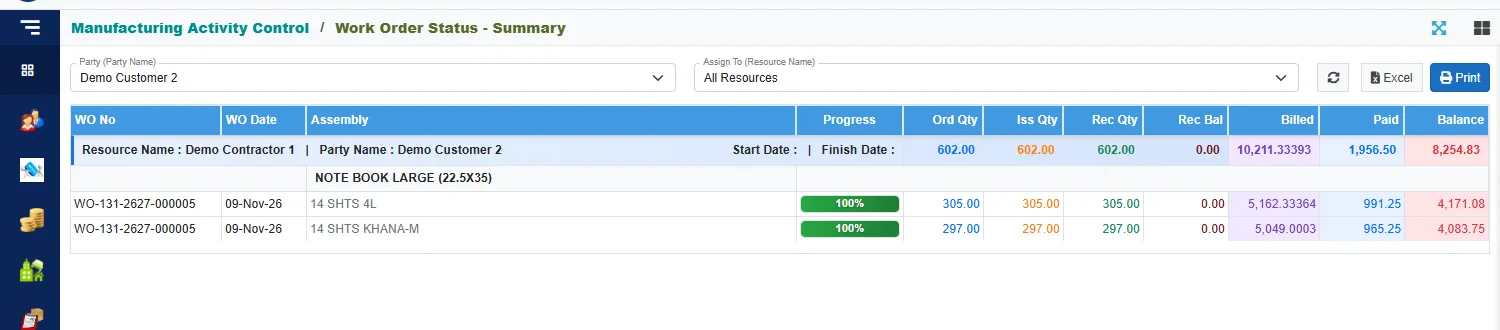
Use the two boxes at the top to narrow it:
- Party (Party Name): one customer, or All Parties.
- Assign To (Resource Name): one contractor, or All Resources.
Each contractor and customer pair has a blue header line with its totals. Under it, each product has a heading, and each work order line has a row:
| Column | Meaning |
|---|---|
| WO No and WO Date | The order and its date. |
| Assembly | The product, and its variant. |
| Progress | How much of the line has been received, as a bar. |
| Ord Qty | The quantity ordered. |
| Iss Qty | The quantity issued to the jobs. |
| Rec Qty | The quantity received. |
| Rec Bal | Ordered less received. A minus means more was received than ordered. |
| Billed | What the contractor has earned for the quantity received: the received quantity times the labour rate. |
| Paid | What has been paid to the contractor. |
| Balance | Billed less Paid: what you still owe the contractor. |
Click the circular arrows to refresh after you change a filter.
Only work done by contractors is billed. Pay the balance on WorkOrder Payments.
Reel Batch Register
The reels that came in, batch by batch, and what became of them.
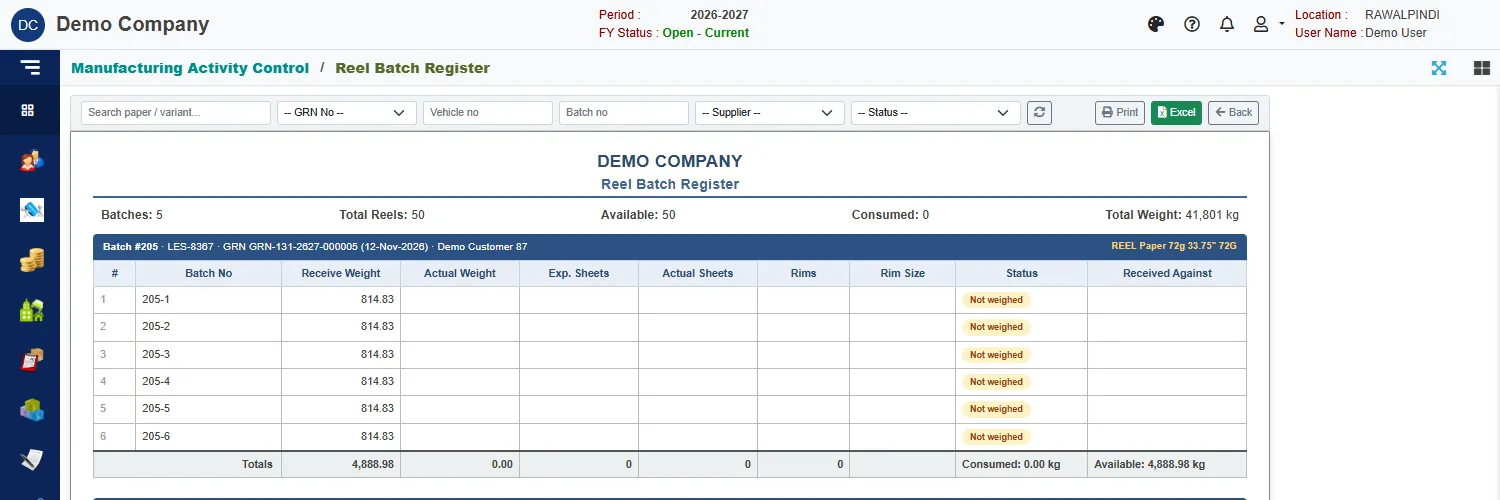
At the top, a summary shows the number of Batches, Total Reels, how many are Available and how many Consumed, and the Total Weight in kilograms.
Each batch has a blue heading with its number, the supplier's reference, the goods received note it came in on (with its date), the supplier, and the paper (for example REEL Paper 72g 33.75" 72G). Under it, one row for each reel:
| Column | Meaning |
|---|---|
| Batch No | The reel, for example 205-3. |
| Receive Weight | The weight it was received at. |
| Actual Weight | The weight when it was weighed. |
| Exp. Sheets and Actual Sheets | The expected and the counted number of sheets. |
| Rims and Rim Size | The rims it was cut into, and their size. |
| Status | Not weighed until the reel has been weighed, then Available until it is used. |
| Received Against | The document the reel was received against, once there is one. |
Each batch ends with its totals, and the weight consumed and still available.
Use the boxes above the report to find a batch: search a paper or variant, pick a GRN No, type a Vehicle no or Batch no, and choose a Supplier or a Status.