What the tab is for
The Requirement & PO tab adds up every material the order needs, compares it with your stock and with purchase orders already open, and shows what is short. You can raise a purchase order for the short items without leaving the order.
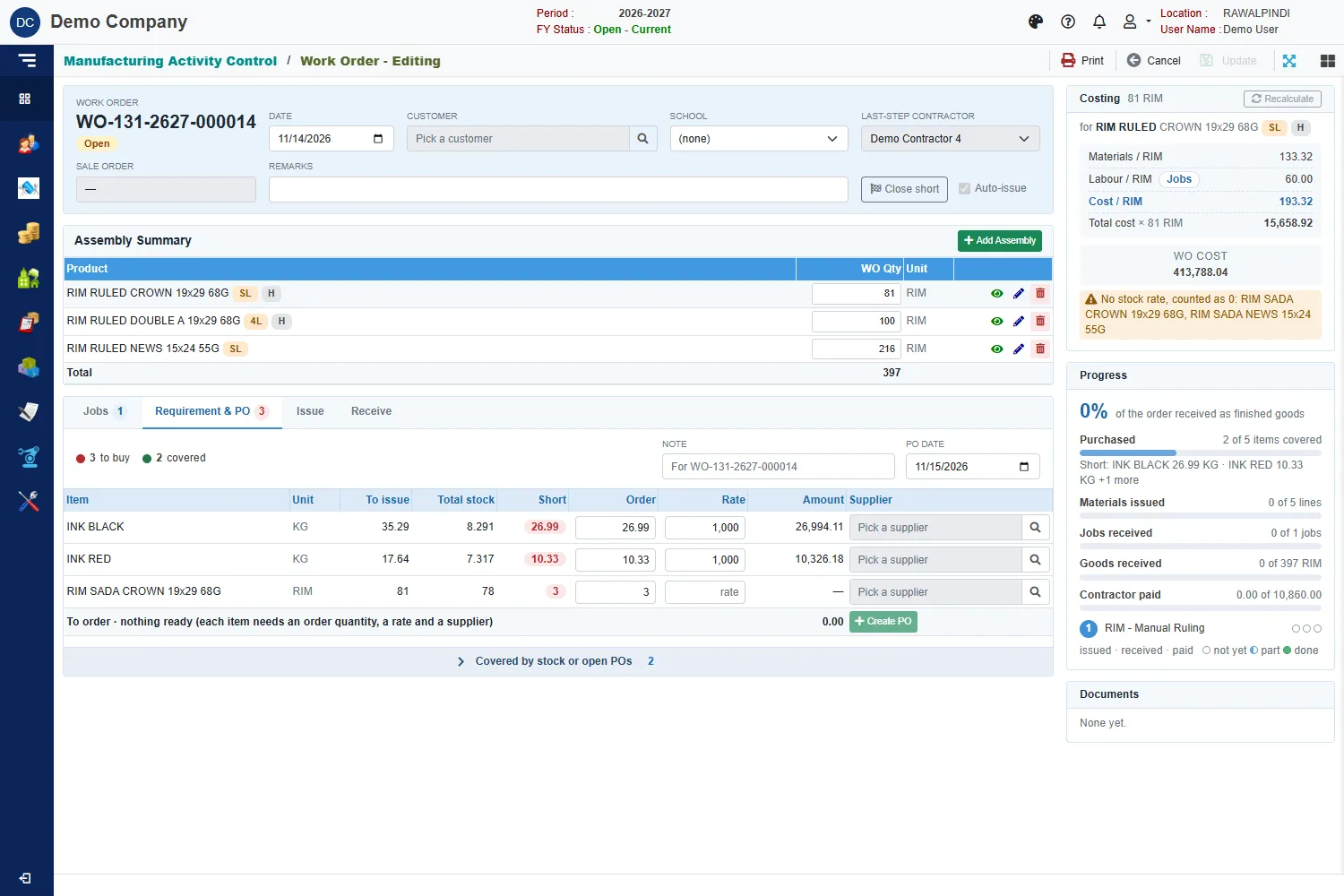
At the top, two counts tell you where you stand: to buy (red) and covered (green).
The columns
| Column | Meaning |
|---|---|
| Item | The material. |
| Unit | Its unit. Rims, film and pins are shown in their pack unit. |
| To issue | How much the order still has to take out of stock. |
| Total stock | What you have in stock now. Stock is shared with other orders. |
| Short | What you still need after stock, and after any purchase order already open for this order. |
| Order | The quantity to buy. It starts at the short quantity. |
| Rate | The price per unit. Type it if it is empty. |
| Amount | Order times rate. |
| Supplier | The supplier for this item. Click the search button to pick one. |
Items that are fully covered are folded under Covered by stock or open POs. Click that bar to see them.
Raise a purchase order
- Check each short item's Order quantity and Rate, and pick its Supplier.
- Set the PO date. It must fall inside the fiscal year. The Note starts with the work order number, for example For WO-131-2627-000014, so the purchase order carries it.
- Click Create PO.
The bar at the bottom shows how many items are ready, and the total. An item is ready only when it has an order quantity, a rate and a supplier. If none is ready, the message says: No item is ready to order: each needs an order quantity, a rate and a supplier.
A green message confirms the purchase order. If you picked more than one supplier, one purchase order is made for each.
The Progress card shows how much of the order is Purchased, for example 3 of 4 items covered, with a list of what is still short.
Items you make yourself
For an item that your own factory makes, the tab offers Make it instead of a supplier. It opens a separate work order for the item, and the message says Order … created to make … It is in the Work Orders list.
Messages you may see
| Message | What to do |
|---|---|
| Nothing is short for this item. | Nothing to order; stock or purchase orders cover it. |
| Order quantity must be a number, 0 or more. | Type a valid quantity. |
| Rate must be a number, 0 or more. | Type a valid rate. |
| The PO date must be in the financial year … | Pick a date inside the fiscal year. |