What they are for
When you press Fill from spec on a product's Recipe tab, PrixERP works the materials out from two tables:
- Card to Bop says which card size, film width and other sizes go with a rim size.
- Consume Rates says how much ink, gum, pins and the like each unit takes.
If either table is missing a row, Fill from spec stops and names the field to fix. See Making a manual recipe.
Card to Bop
Open Card to Bop under Setup Forms on the Manufacturing page.
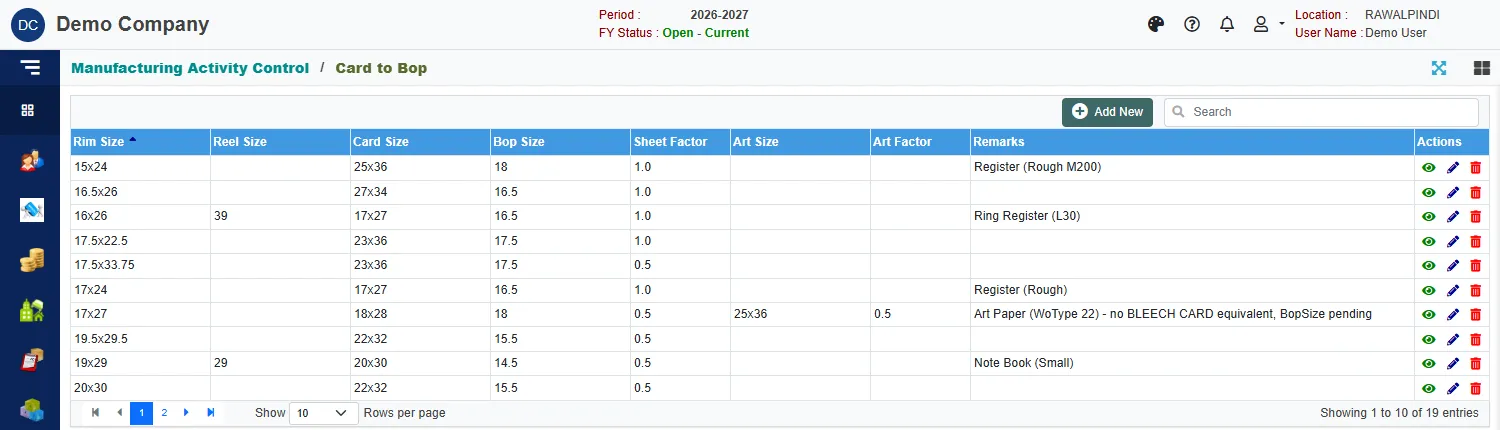
Each row ties a Rim Size to the other sizes used with it:
| Column | Meaning |
|---|---|
| Rim Size | The size of the ruled paper (rim). |
| Reel Size | The reel size, where the paper comes from a reel. |
| Card Size | The card sheet used for covers with this rim. |
| Bop Size | The film width used to laminate. |
| Sheet Factor | The factory's full or half rim convention: 1.0 for a full rim, 0.5 for a half rim. It multiplies the sheets a book takes. |
| Art Size and Art Factor | The same for art paper covers. |
| Remarks | A note, for example which product the row was made for. |
Click Add New to add a row, the pencil to change one, and the eye to read it. The form has a field for each column above, plus the sizes' ids and the sheet cut size.
Do not change a Sheet Factor casually. A small rim size carries the larger factor (1.0), and a large rim size the smaller one (0.5). That is how the factory counts, and every recipe built from the spec follows it.
Consume Rates
Open Consume Rates under Setup Forms.
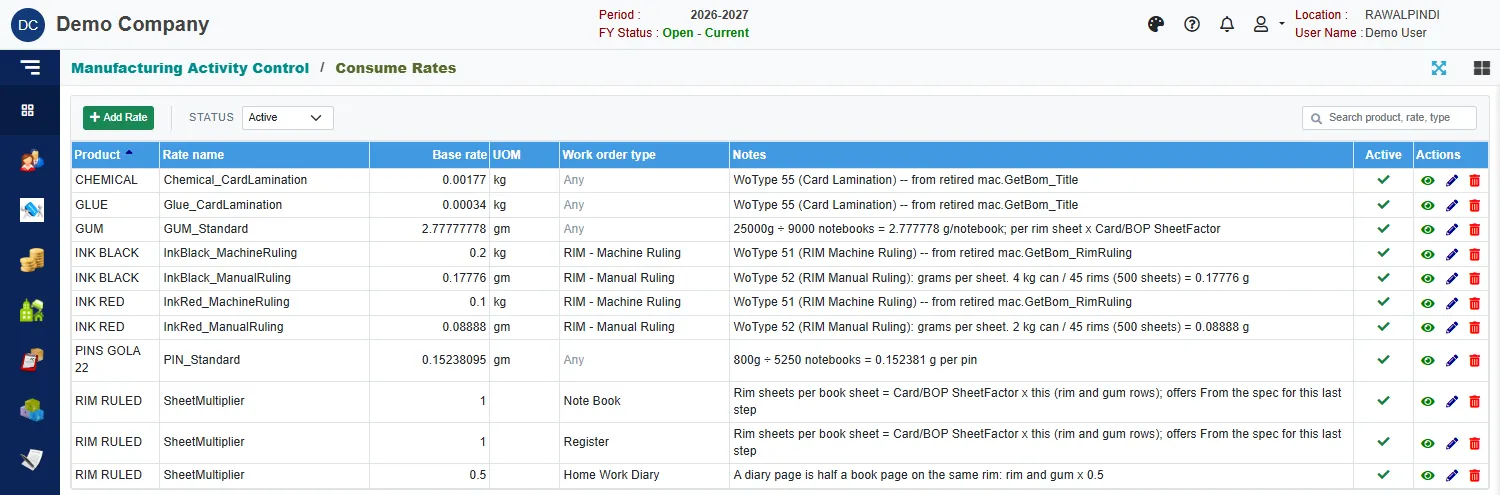
Each row is a consumption figure for one product:
| Column | Meaning |
|---|---|
| Product | The material, for example INK BLACK, GUM or PINS GOLA 22. |
| Rate name | A name that says what the rate is, for example InkBlack_ManualRuling. |
| Base rate and UOM | The quantity per unit and its unit, for example 0.17776 gm. |
| Work order type | The type the rate applies to, or Any. |
| Notes | How the figure was worked out. |
| Active | Whether it is used. |
The SheetMultiplier rows are special. They are what makes Fill from spec available for a work order type (today Note Book, Register and Home Work Diary). RIM RULED with a multiplier of 1 means one rim sheet per book sheet, and 0.5 for a diary means a diary page is half a book page.
To add a rate, click Add Rate:
| Field | What to enter |
|---|---|
| Product | Required. The material. |
| Rate name | A name for the rate. |
| Work order type | The type it applies to, or leave blank for any. |
| Base rate | Required. The quantity per unit. |
| UOM | The unit of the rate. |
| Notes | How you worked it out. Say so, so the next person can check it. |
| Active | Untick to stop using it. |
Status at the top starts on Active.
Change a consume rate only with the person who knows the factory figures. Every recipe filled from the spec after the change uses the new rate. Recipes already saved keep their numbers.