01 — Administration

Set the rules once. The system enforces them everywhere, forever.

This is where you decide who your business is and who's allowed to do what inside it. Set someone up as a storekeeper and they see storekeeper screens — in every module, on every device, without anyone having to remember to restrict them. Change what a role can do and everyone in that role changes with it.

What you get

Everything Administration does for you.

  • Run several companies or branches from one login, each with its own books
  • Set a new hire up in a minute: pick their role and they're done
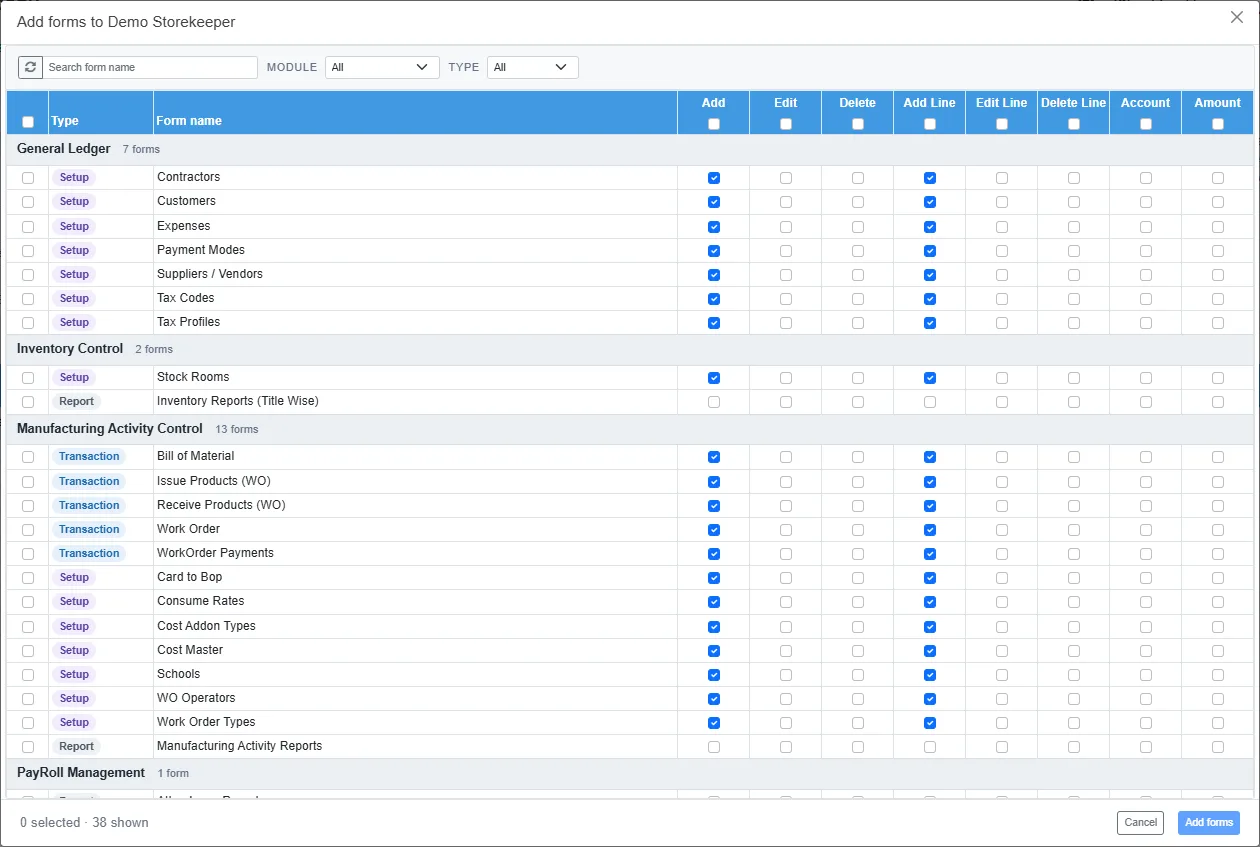
  • Decide screen by screen who can view, add, edit or delete — right down to whether someone can remove a single line from an invoice
  • Grant a whole module at once instead of ticking a hundred boxes, and see exactly what someone can reach before you save
  • Every screen in the system obeys these rules, so nothing gets added later that quietly bypasses them
  • Report on one branch or site on its own when you need to
  • Deactivate someone the day they leave and their access is gone everywhere at once
  • Locations and sites set up once and used by stock, assets and payroll alike
  • Ten colour themes for the screens, so the system looks like yours
  • Help on every screen: press ? for the article about the screen you're on, or open the full user manual for any module
Form spotlights

The screen that makes the difference.

Form spotlight

User Access

Setting up a new person usually means clicking through screen after screen guessing what they'll need. Here you grant by module or by role in a single pass, then review the complete list of what they can reach before you commit it.

See it working with your own numbers.

Bring a month of your real documents to the demo. We will show you the ledger entries they produce, and the reports they land in.