What a payslip is made of
Once a month you generate a payslip for each employee. The payslip takes everything that happened to the employee in that month and turns it into a net salary:
| It starts with | From |
|---|---|
| The allowances: basic pay, house rent, medical, conveyance and so on | The employee's pay scale and pay structure, kept on the employee's record in Human Resources. A pay scale increment changes them. |
| Attendance: days present, absent, on leave, late, early out | The attendance machine scans, with anything you mark in In/Out, and the leave entries. |
| Overtime | The overtime entries. |
| Less the deductions: absent days, advances, loan instalments | The advances and loans you have given, and the absences. |
The result is the net salary, paid in cash, through the bank, or split. The payslip posts an accounting voucher.
The Payroll module page
Open Payroll from the left strip.
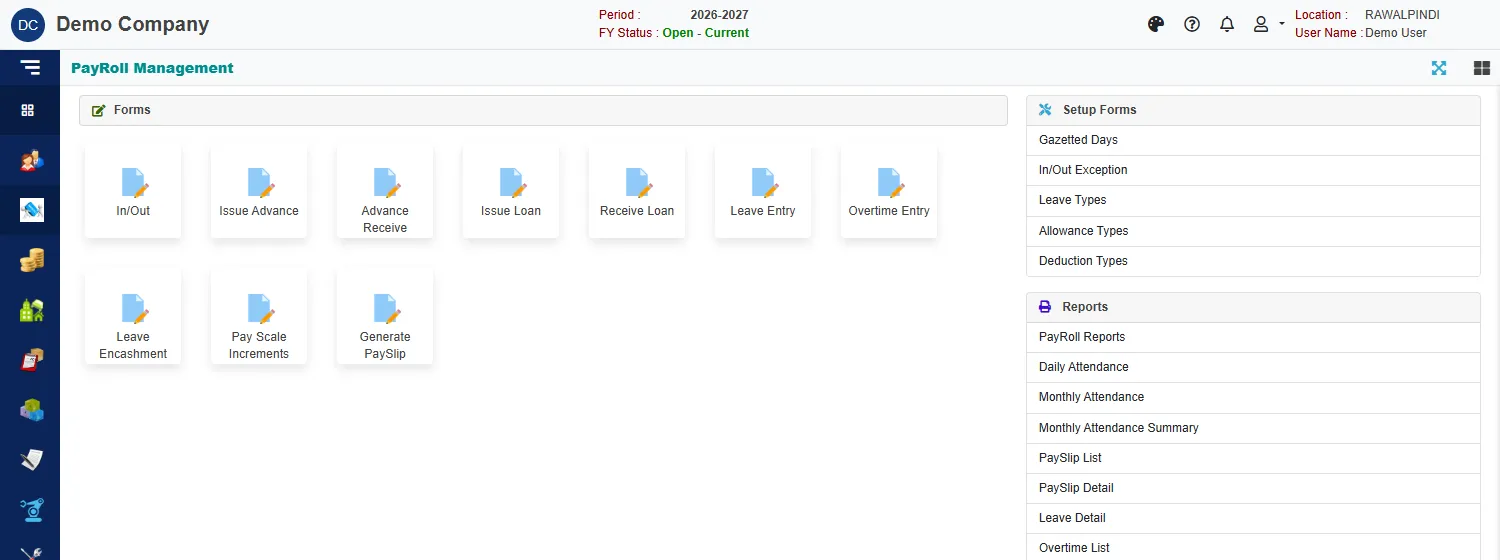
| Group | What is in it |
|---|---|
| Forms | In/Out, Issue Advance, Advance Receive, Issue Loan, Receive Loan, Leave Entry, Overtime Entry, Leave Encashment, Pay Scale Increments and Generate PaySlip. |
| Setup Forms | Gazetted Days, In/Out Exception, Leave Types, Allowance Types and Deduction Types. See Payroll setup lists and In/Out and exceptions. |
| Reports | PayRoll Reports and the attendance reports. See Payroll reports. |
The month, in order
- Before the month: keep the setup lists up to date, with the holidays for the year and the leave types.
- During the month: record leave and overtime as they happen. Give advances and loans, and note repayments.
- After the month ends: check attendance for days with no scan, and mark each one.
- Generate the payslips with Generate PaySlip. Check them, then print them.
- Reports: the payslip list for the month, and the bank deposit list if you pay through the bank.
From time to time: Pay Scale Increments when salaries go up, and Leave Encashment when unused leave is paid.
Numbers you will see
| Prefix | Document |
|---|---|
AIS- |
Advance issued |
ARE- |
Advance received back |
LIS- |
Loan issued |
LRE- |
Loan repayment received |
ENC- |
Leave encashment |
SLP- |
The accounting voucher of a payslip |
For example AIS-131-2627-000001: the document, the company (131), the fiscal year (2026-27) and a running number. A payslip has its own Pay Id.
Related
- Lists (index pages) and Entering and changing documents explain the screens every form shares.
- General Ledger: how the accounts work explains the vouchers that advances, loans and payslips post.
- Employees and Employee pay, allowances and leaves explain the employee record that Payroll reads.