The entry form
Click Add on a list, or the pencil icon on a row, to open the document's form. The title in the top bar says what you are doing, for example Product Receive - Adding.
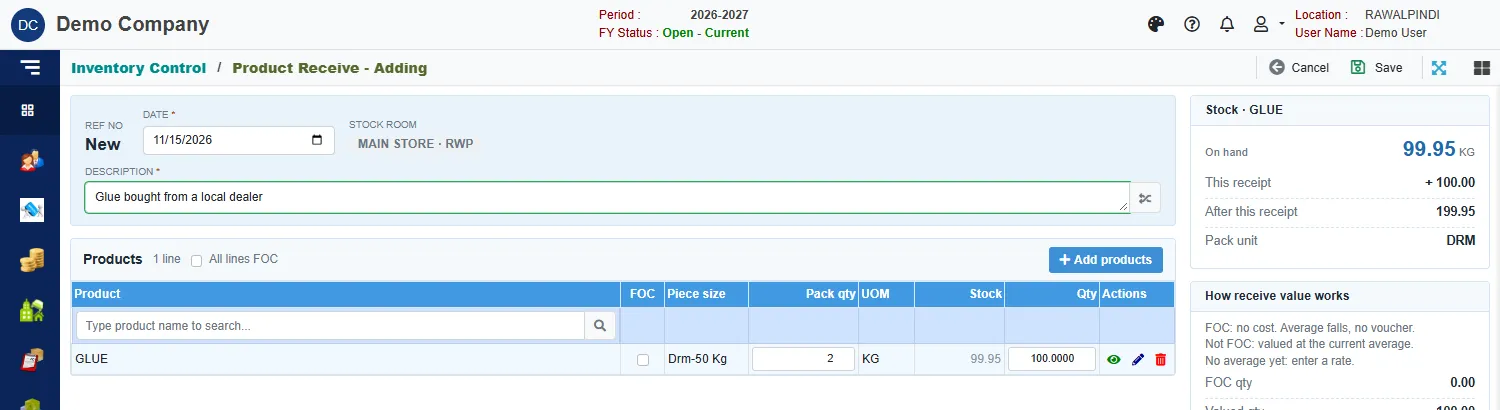
A form has the same parts almost everywhere:
- Header: the document number (New until saved), the date, and the other fields that apply to the whole document.
- Lines: the products, accounts or items the document is about. Add them with the search box above the table or the Add products button.
- Side cards: figures that update as you type, such as stock on hand or totals. You cannot type in them.
- Top bar, right side: Cancel and Save.
A star next to a field name means it is required.
Dates
The date must fall inside the fiscal year you connected to. The calendar will not let you pick a date outside it.
Adding lines
- Click Add products, or type part of a name in the search box above the table.
- In the window that opens, click + Add on each product you need. Products with several variants show Select: click it, then add the variant you want.
- Click Done.
Use the icons at the end of a line to see it (eye), change it (pencil) or remove it (bin). The same product and variant cannot be added twice on one document.
Save
Click Save at the top right. The first save gives the document its number, for example REC-131-2627-000001. A green message confirms it.
If something is missing or wrong, a message appears at the top and nothing is saved. Fix what it names and click Save again. Opps! Nothing to save means you have not changed anything.
Click Save once and wait for the message before you do anything else.
Cancel
Cancel closes the form without saving. Changes you have not saved are lost.
Delete
Click the bin icon on a list row. A box asks you to confirm. On documents that move stock or post a voucher, deleting also reverses them, so stock and accounts go back as if the document had never been entered.
If a document cannot be deleted, a message tells you why. Read it before you try again.
If a button is greyed out
Your role decides which buttons work. If Add, a pencil or a bin is greyed out, your role does not include it. Ask your administrator.