What it is for
An overtime entry records the hours an employee worked beyond their normal hours. When you generate the month's payslip, the overtime of that month is added as an OVERTIME allowance.
The list
Open Payroll and click Overtime Entry.
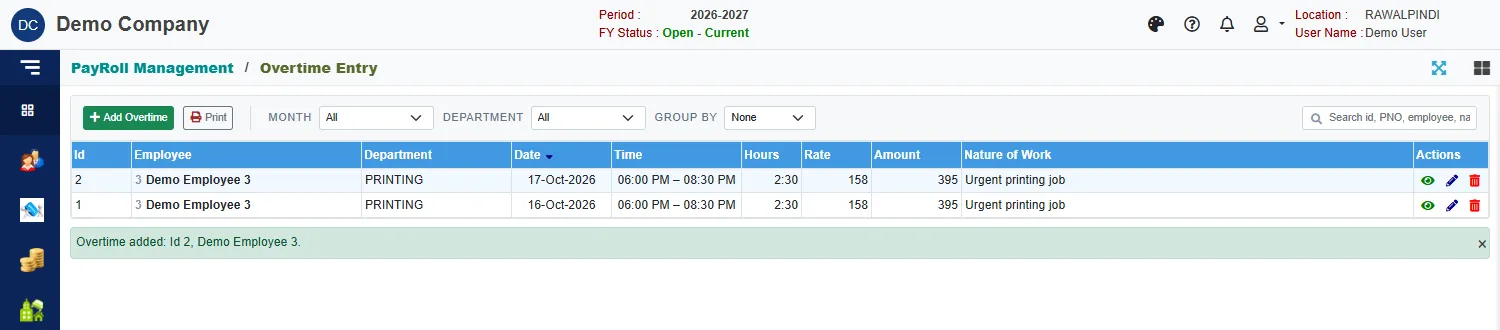
Each row shows the Id, the employee, the department, the Date, the Time from and to, the Hours, the Rate per hour, the Amount and the Nature of Work. Narrow it with Month, Department and Group by, or search by id, PNO or name. Print prints the list.
Enter overtime
Click the green Add Overtime.
In the window Select Employee, click a row and Ok (or double-click it).
Fill in the entry:
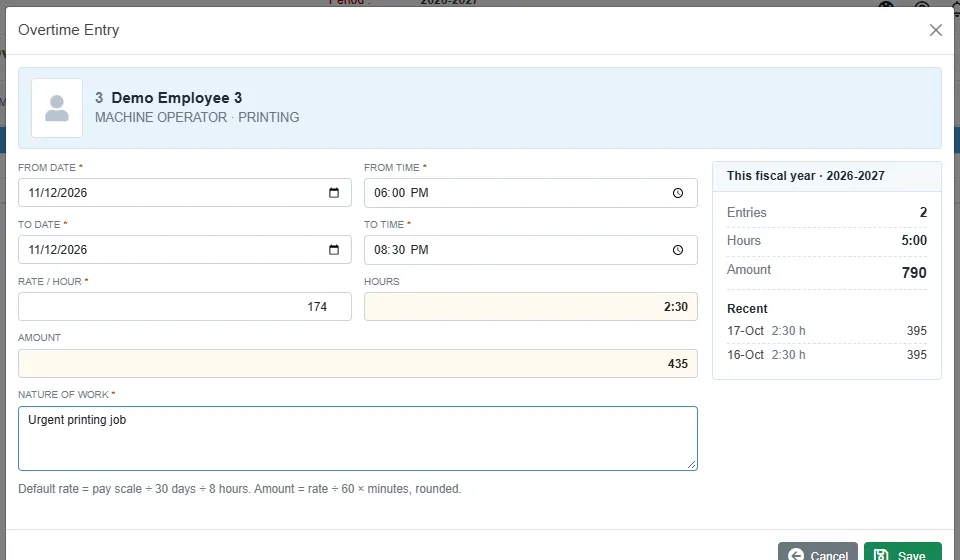
An overtime entry Field What to enter From date and From time Required. When the overtime started. To date and To time Required. When it ended. It must be later than the start. Rate / hour Required. It starts at the employee's pay scale divided by 30 days and 8 hours. You can change it. Hours Worked out from the times. Amount Worked out: the rate divided by 60, times the minutes, rounded. Nature of work Required. What the overtime was for. Click Save.
The card This fiscal year shows the employee's number of entries, hours and amount so far. In the example, 2 hours 30 minutes at 158 an hour is 395.
How it reaches the payslip
When you generate the payslip for a month, the overtime entries dated in that month are added up and shown as the OVERTIME allowance. An entry you delete is not paid.
Messages you may see
| Message | What to do |
|---|---|
| From and To date/time are required | Fill in all four boxes. |
| To time must be after From time | Correct the times. |
| Overtime rate is required | Enter the rate per hour. |
| Nature of work is required | Say what the overtime was for. |
Related
- Generate PaySlip
- Payroll reports: the overtime list report.