What they are for
Closing a fiscal year carries the closing balances of the accounts and the stock into the next year. If something is wrong, it is wrong in the new year too. The Closing Reports find the problems first.
Open General Ledger, then Closing Reports under Reports.
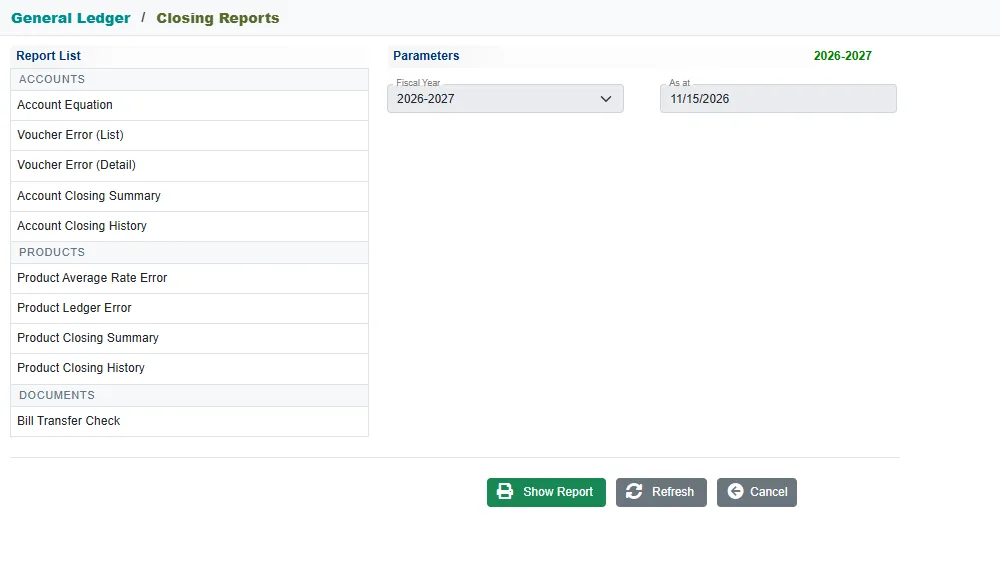
Pick a report on the left. A note on the right says what it checks and whether to run it before or after closing. Most ask only for a Fiscal Year and an As at date. Click Show Report.
Before closing
Run these for the year you are about to close. Each should come out clean.
| Report | What it checks |
|---|---|
| Account Equation | That assets equal liabilities plus capital plus the year's profit, as at the date. Below it, the accounts whose nature does not match their note, which puts them in the wrong part of the balance sheet. |
| Voucher Error (List) | Every voucher of the year whose debit and credit are not equal. |
| Voucher Error (Detail) | The lines of each unbalanced voucher, so you can see which side is missing. |
| Product Average Rate Error | Stock transactions whose stored average rate does not follow from the transaction before them, so their cost is wrong. |
| Product Ledger Error | Stock that runs below zero in a store during the year, and stock balances that differ from their transactions. |
| Bill Transfer Check | Documents whose Transfer tick disagrees with their posted voucher, and ticked documents that were never posted. |
The account equation
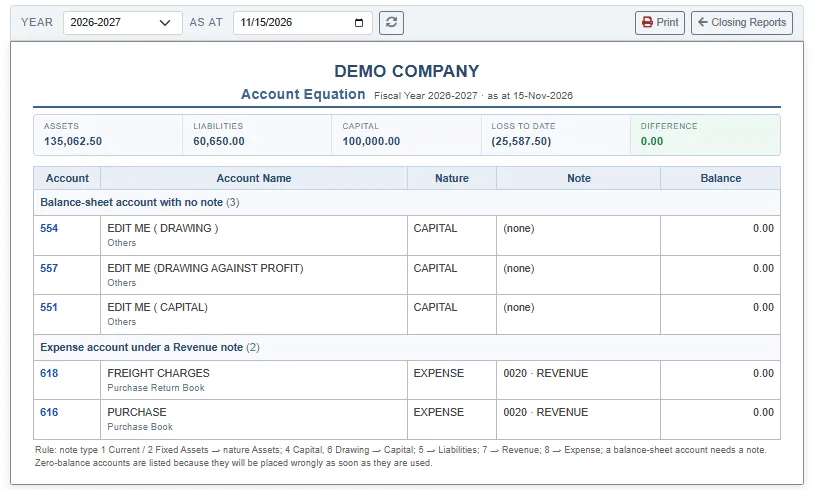
The top shows Assets, Liabilities, Capital, Loss to date (or profit) and the Difference, which should be 0.00. Below are the accounts that are placed wrongly, grouped by the kind of problem, for example Balance-sheet account with no note or Expense account under a Revenue note. Open the account in Accounts and fix its note or nature.
After closing
Run these for the year that was closed, to see that the next year opened with the same figures.
| Report | What it shows |
|---|---|
| Account Closing Summary | Each balance-sheet account's closing balance for the year next to its opening balance in the next year. Pick the year being closed. |
| Account Closing History | The same comparison for every year that has a year after it, showing only the differences. It needs no dates. |
| Product Closing Summary | The closing stock of the year for each product, variant and store, with a status icon. |
| Product Closing History | The flagged items of every year before the current one. It needs no dates. |
How to use them
- Fix what the Before closing reports find: correct or delete the faulty voucher, or fix the account note.
- Run them again until they are clean.
- Once the year has been closed, run the After closing reports and check that the differences are nil.
Related
- Account reports: the Trial Balance has a Check Errors button for a similar check.
- Opening balances
- Accounts, customers and suppliers