What is here
Open General Ledger, then Account Reports under Reports. The left side lists the reports. The right side holds the filters that the report you pick uses.
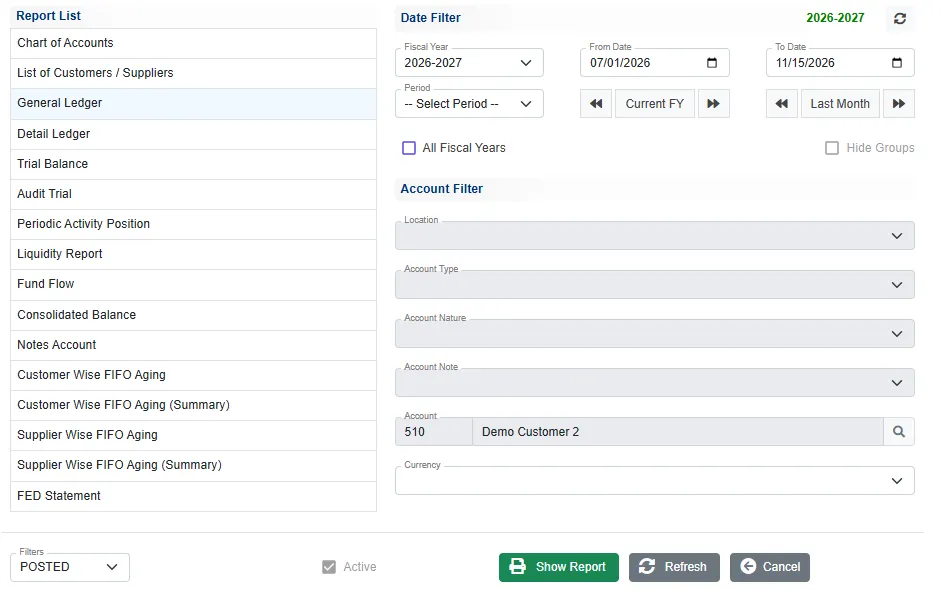
| Report | What it shows |
|---|---|
| Chart of Accounts | Every account, grouped by category, with its type and nature. |
| List of Customers / Suppliers | The contact details of the customers or the suppliers. Pick an Account Type first. |
| General Ledger | Every entry of one account in a fiscal year, with a running balance. |
| Detail Ledger | The same for a date range that may run across fiscal years. |
| Trial Balance | Opening, period and closing figures of every account, grouped by category. |
| Audit Trial | Every voucher of the period with all its lines. |
| Periodic Activity Position | The movement of each account in each month, July to June, and the closing balance. |
| Liquidity Report | Cash and bank accounts: opening, debit, credit, movement, closing, credit limit and what is available. |
| Fund Flow | The movement under each account note. |
| Consolidated Balance | Opening, debit, credit and closing of every account on one list. |
| Notes Account | Accounts grouped under their account note, with a total for each note. |
| Customer Wise FIFO Aging, Supplier Wise FIFO Aging and their (Summary) versions | What is owed, by age. |
Run a report
- Click the report in the Report List.
- Set the dates. Pick the Fiscal Year, or a Period such as Full FY, This Month, Last Month or Last 3 Months, or type the From Date and To Date. Current FY fills in the whole year. The arrows beside the dates move a year back or forward.
- Fill in the Account Filter the report needs. The fields that do not apply to the report are greyed.
- The Filters box beside Show Report picks which vouchers to count: POSTED (the default), UN-POSTED or ALL.
- Click Show Report.
The report opens in place of the filters, with your company heading. Print prints it, Excel saves it as a spreadsheet and Back returns to the filters.
General Ledger
This is the report you will use most. Pick General Ledger, then use the search button beside Account to choose the account. An account is required: without it you get Account is required.
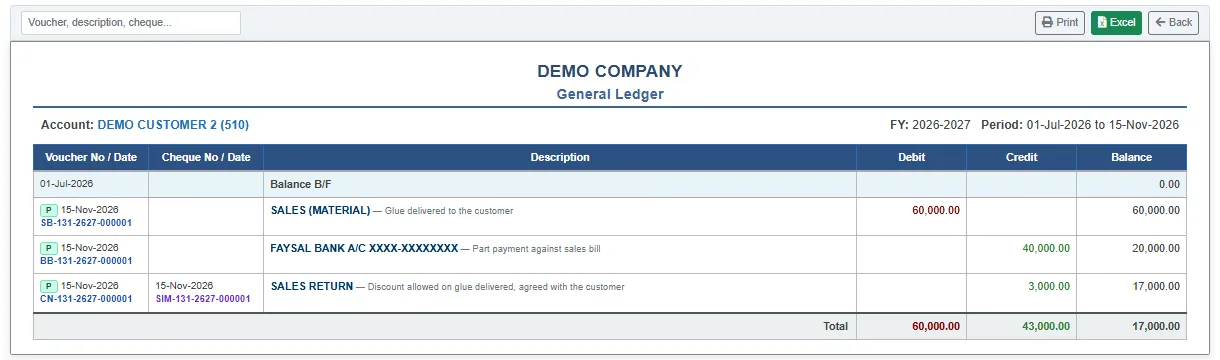
The report shows the balance brought forward, then each voucher with its date and number, the cheque, the other account and description, the Debit and Credit, and the running Balance. A green P marks a posted voucher, and an amber U an unposted one. A negative balance is in brackets.
- Type in the box at the top left to find a voucher by number, description or cheque.
- Click a voucher number to open the voucher in a window.
- To see the account in a foreign currency, pick a Currency before you show the report.
Detail Ledger looks the same, but runs over any date range, including several fiscal years.
Trial Balance
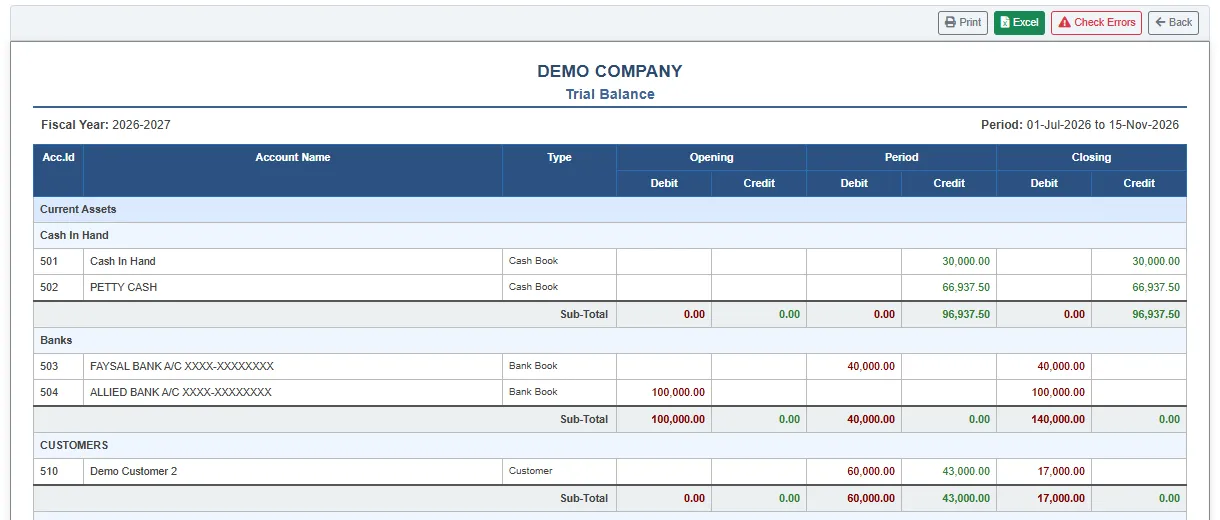
The trial balance lists the accounts grouped by category, with sub-totals, and the Opening, Period and Closing columns each split into Debit and Credit. The totals of the debit and credit columns must be equal.
The button Check Errors at the top opens a check of the books. It lists vouchers whose debit and credit differ, periods that do not balance, opening balances that do not balance, and lines that belong to no voucher. Each list is empty when the books are sound. See also Closing reports.
Customer and supplier ageing
Customer Wise FIFO Aging lists each customer's unpaid invoices with the Invoice Date, Amount, Due Date, the Days past, and the amount in each age band: 0–30 Days, 31–60 Days, 61–90 Days and Over Due. Payments are applied to the oldest invoice first.
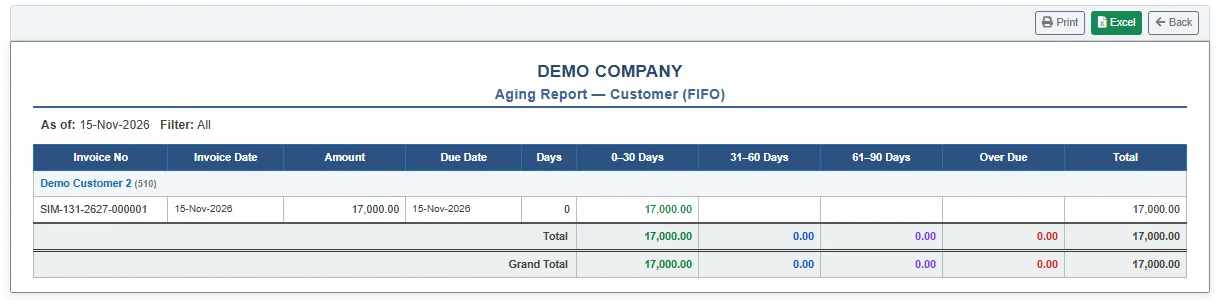
The (Summary) versions give one row for each party. The supplier versions do the same for the bills you owe. Ageing is as at the To Date; the From Date is not used.
Other reports in a few words
- Liquidity Report lists the Bank Book and Cash Book accounts with their balances and totals. Use it as the morning check on cash and bank.
- Notes Account and Fund Flow group the accounts by account note. See Notes and categories.
- Periodic Activity Position shows which months the movement came in.
- Audit Trial is a printout of every voucher, for checking against the documents.
Related
- Invoice status and tax registers
- Closing reports
- Cash Vouchers, Bank Vouchers and General Journal make the entries these reports add up.