What it is for
A cash voucher records cash going out (a Payment) or coming in (a Receipt) through one of your cash accounts, such as Cash In Hand or Petty Cash. Each line says who the money was paid to, or received from.
- A payment debits the account you paid and credits the cash account.
- A receipt debits the cash account and credits the account you received from.
For money that goes through a bank, use a Bank Voucher.
The list
Open General Ledger and click Cash Vouchers.
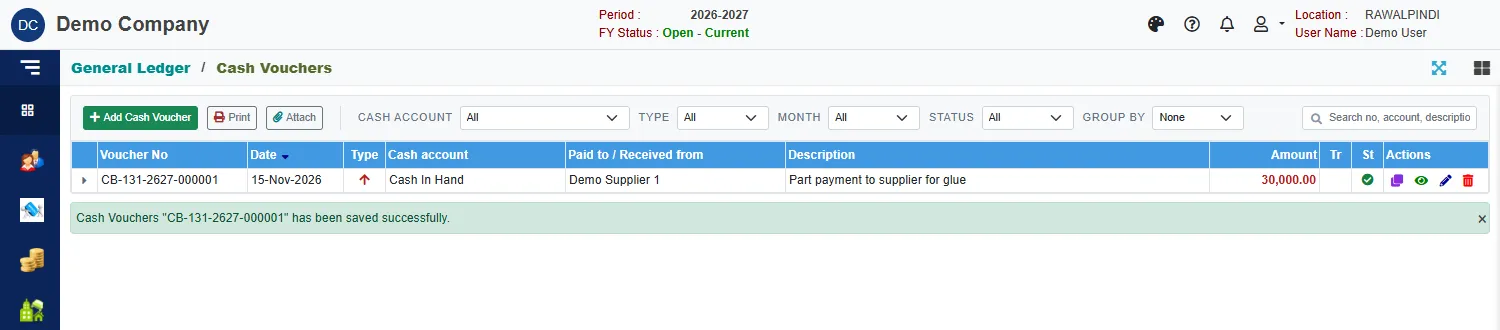
Each row shows the Voucher No, date, Type (an arrow down for a receipt, up for a payment), the cash account, who was paid or who paid, the description and the amount. The Tr column ticks a transfer, and St shows a green tick when the voucher is posted.
Use Cash account, Type, Month, Status and Group by to narrow the list, and the search box to find a voucher by number, account or description. Click the small arrow at the start of a row to see its lines.
The buttons above the list act on the selected voucher: Print opens the voucher in a window, and Attach adds documents to it. On each row, the icons are Clone, View, Edit and Delete.
Enter a cash voucher
Click the green Add Cash Voucher.
Check the Voucher date. It must fall inside the fiscal year.
Click Receipt or Payment.
Pick the Cash account: type in the box, or use the search button.
Type a Description.
Click Add line for each account paid or received from. In the window:
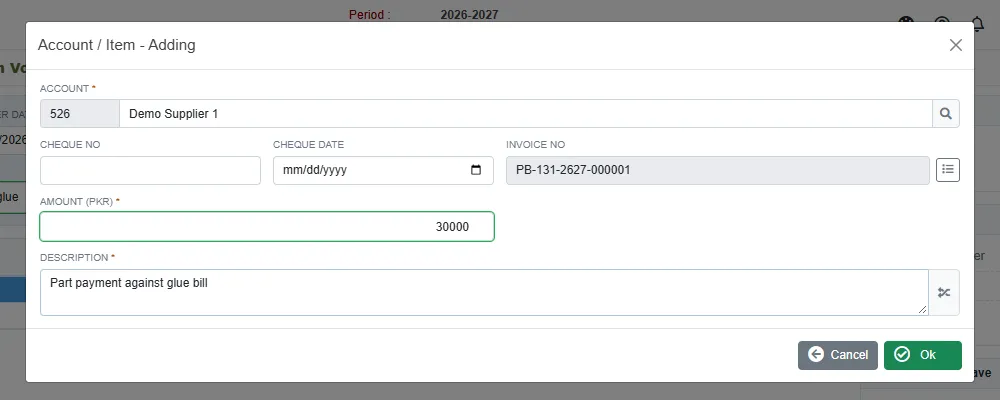
A line for a payment to a supplier Field What to enter Account Required. Type to search, for example the supplier. Cheque No and Cheque date Only if a cheque is involved. Invoice No Click the list button to pick an open invoice of this account. See below. Amount Required. Must be more than zero. Description Required. The button beside it copies the voucher description. Click Ok, then add more lines if you need them, and click Save.
A green message confirms it, for example CB-131-2627-000001.
Settle an invoice
When the line is for a supplier or a customer, click the list button beside Invoice No. The window shows that account's open invoices with what was Billed, Paid, Debited (notes) and Adjusted, and the Balance still open.

Click the invoice and Ok. It is named on the line, and the amount starts at the balance. Lower it for a part payment. Naming the invoice is what lets the invoice status reports show it as paid, or part paid.
The cards on the right
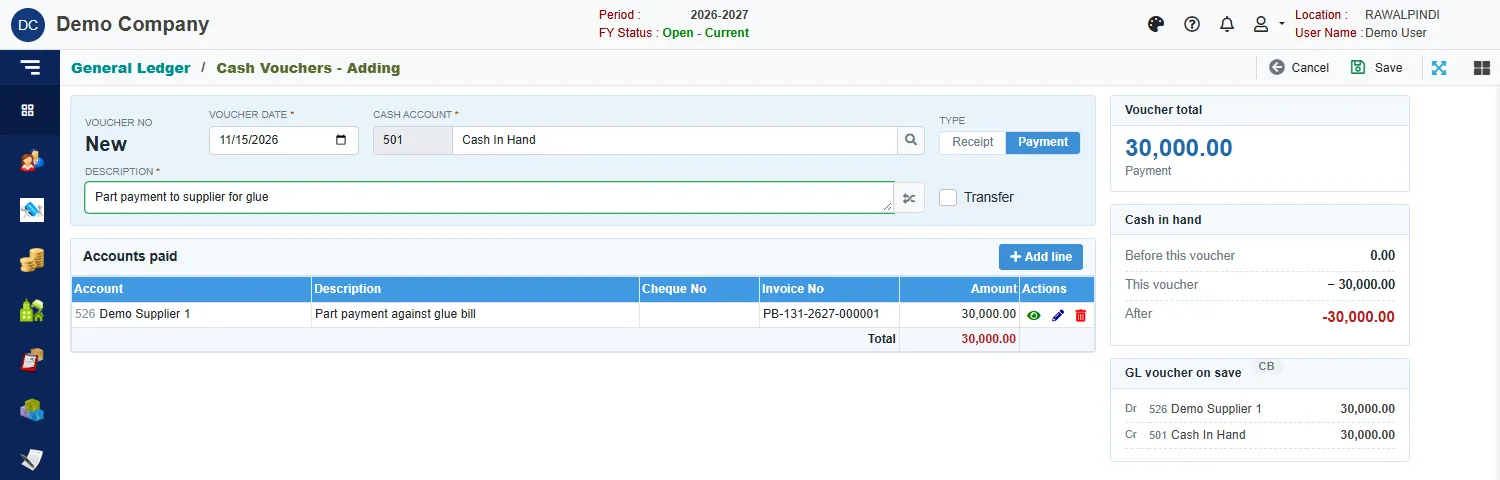
- Voucher total: the sum of the lines, and whether it is a receipt or a payment.
- Cash in hand: the cash account's balance on the voucher date Before this voucher, the effect of This voucher, and the balance After. It turns red when the balance would be below zero. It warns you, but does not stop you saving.
- GL voucher on save: the entry that will be posted. For the payment above: debit Demo Supplier 1 30,000, credit Cash In Hand 30,000.
Print a voucher
Select the voucher in the list and click Print, or click Print at the top while you are viewing it. The voucher opens in a window with your company heading, the lines, the total in words and the Posted or Unposted mark.
Copy a voucher
Click Clone on a row to start a new voucher with the same lines, dated today. The cheque numbers are not copied, because they belong to the first voucher.
Messages you may see
| Message | What to do |
|---|---|
| Account/Item is required | A line has no account. Pick one. |
| Amount must be greater than zero | Enter the amount on the line. |
| Currency is required / Currency Rate is required | The line is in a foreign currency: pick the currency and enter its rate. |
| Opps! Nothing to save | You have not changed anything. |
| Voucher … is posted … Ask the approver to un-post it | The voucher is posted and locked. See Voucher Audit. |
Related
- Bank Vouchers
- General Ledger: how the accounts work
- Account reports: the ledger of the cash account shows every voucher.