The purchase documents
A purchase moves through a chain of documents, each made from the one before it.
| Step | Document | What it does |
|---|---|---|
| 1 | Purchase Order | What you have ordered from a supplier. It changes no stock. |
| 2 | Goods Receive Note | The goods arriving. It adds them to stock. |
| 3 | Purchase Bill | The supplier's invoice. It posts the purchase to the supplier's account. |
| 4 | Returns and debit notes | Goods or value going back to the supplier. |
Orders can also be raised from the Requirement & PO tab of a work order, for the materials that order is short of. See Requirement and purchase orders.
The Purchase module page
Open Purchase from the left strip.
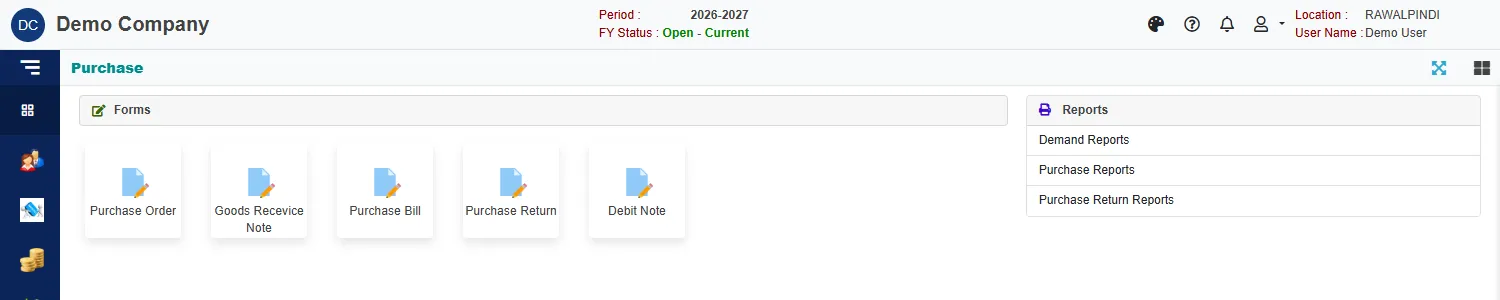
| Group | What is in it |
|---|---|
| Forms | Purchase Order, Goods Receive Note, Purchase Bill, Purchase Return and Debit Note. |
| Reports | Demand Reports (the printed documents), Purchase Reports and Purchase Return Reports. See Purchase reports and documents. |
How the documents are linked
Each document is made by picking from the one before it:
- A goods receive note uses Add from pending orders: the supplier's order lines that have not been fully received.
- A purchase bill uses Add from pending GRNs: received goods that are not yet billed. Its Source card names the receive note and the order.
- A purchase return or debit note uses Add from bills: the supplier's billed lines, with what was Purchased, what is Returned and the Balance.
So you receive what is pending on an order, and you bill what has been received.
Numbers you will see
| Prefix | Document |
|---|---|
PO- |
Purchase order |
GRN- |
Goods receive note |
PB- |
Purchase bill (and its accounting voucher) |
PR- |
Purchase return |
DN- |
Debit note |
For example PB-131-2627-000001: the document, the company (131), the fiscal year (2026-27) and a running number.
Related
- Lists (index pages) and Entering and changing documents explain the screens every document shares.
- Sales: how a sale flows is the same chain for selling.