What it is for
A purchase order records what you have ordered from a supplier, at what rate. It does not touch stock or accounts. When the goods arrive, you receive them with a Goods Receive Note made from the order, which keeps track of what is still to come.
The list
Open Purchase and click Purchase Order.
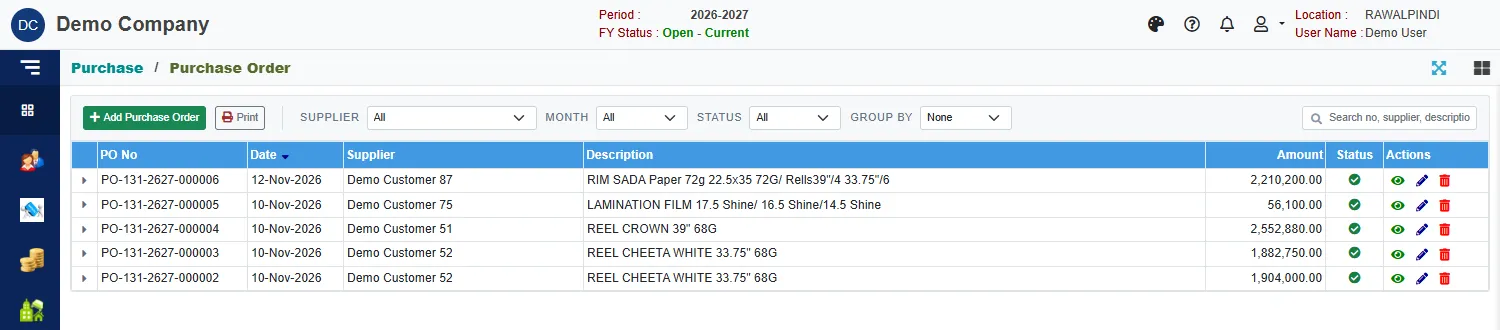
Each row shows the PO No, date, supplier, description, amount and Status. Use Supplier, Month, Status and Group by to narrow the list, and the search box to find an order.
Enter a purchase order
Click the green Add Purchase Order.
A window opens: Select Supplier/Vendor. Click a row, then Ok (or double-click a row). Type in the search box to find a supplier.
Check the PO date (inside the fiscal year), and set Delivery by to the date you expect the goods.
Type a Description.
Click Add products, or type in the product box above the table. In the window, click + Add on each product, then Done.
On each line, enter the Pack qty and the Pack rate. Qty, Rate and Amount are worked out for you. For example 2 drums of glue at 50,000 a drum is 100 kg at 1,000 a kg, 100,000 in all.
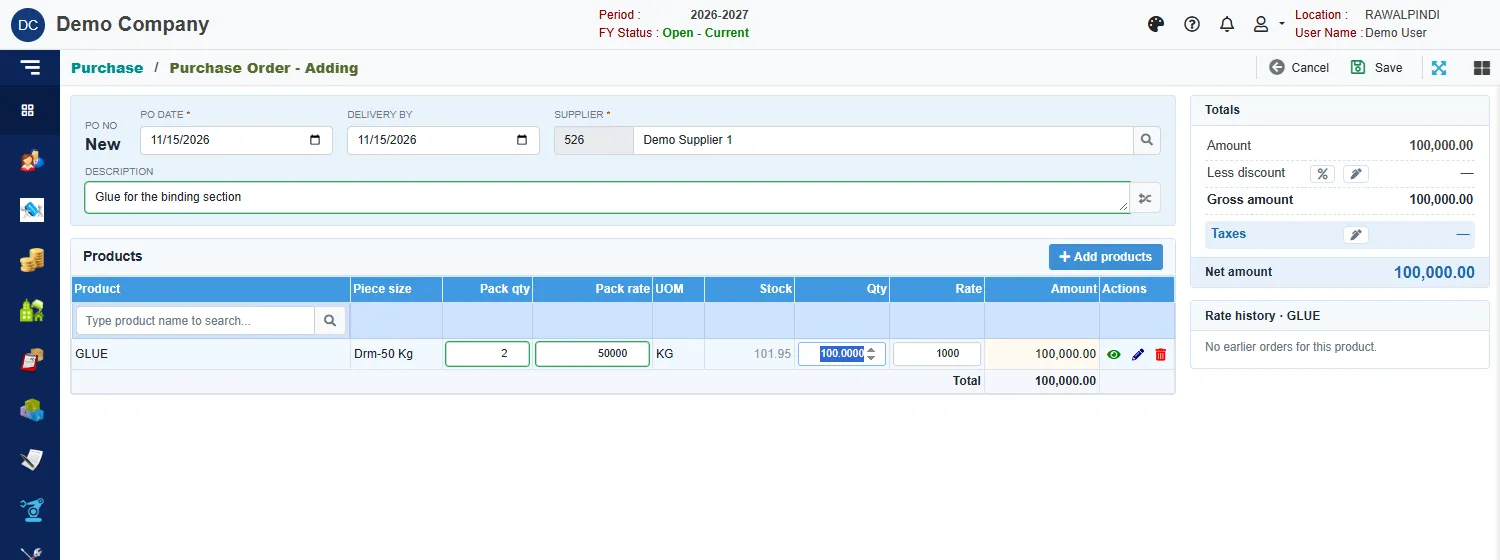
A purchase order for glue Click Save.
A green message confirms it with the number, for example PO-131-2627-000007.
The cards on the right
- Totals: Amount, Less discount, Gross amount, Taxes and Net amount. Click % or the pencil to enter a discount or taxes.
- Rate history: for the line you have selected, the rates you paid on earlier orders. It says No earlier orders for this product the first time.
Paper bought by the rim
For paper, the form also shows the weight of the rims and the rate per kilogram. Hover over the figures to see what each one is: Rate of paper in kg, Rim weight: kg × rate per kg, Total No of rims and Total rim weight.
Close an order
A closed order drops out of the pending list that receive notes pick from, so nobody receives against it. An order that has been closed is marked as closed when you open it.
Messages you may see
| Message | What to do |
|---|---|
| Item is already added … | The product is already on this order. Change its quantity instead. |
| Item is already added … against demand … | The product is already on the order for that demand. |
| Currency is required / Currency Rate is required | The order is in a foreign currency: pick the currency and enter its rate. |
| Opps! Nothing to save | You have not changed anything. |
Print the order
Use Print on the list, or print it from Demand Reports. See Purchase reports and documents.