What Human Resources is for
Human Resources keeps one record per employee: who the person is, where they work, what they are paid and how. Payroll reads that record every month. An employee who is not in Human Resources cannot get a payslip, and a mistake in the record (a wrong pay scale, a missing bank account) shows up on the payslip.
| The record holds | Payroll uses it for |
|---|---|
| Name, father name, C.N.I.C., photo, contact details | The payslip header and the employee reports. |
| Department, designation, employee type, location, joining date, status | Who is on the month's payroll, and the groups on reports. |
| Pay scale, allowances and deductions | The lines of the payslip. See Employee pay, allowances and leaves. |
| Payment mode: cash, bank or split, with the bank account | How the net salary is paid. |
| Leaves allowed in the fiscal year | The leave balance on Leave Entry and the payslip. |
| Auto attendance | Whether the employee needs attendance machine scans. |
The Human Resource module page
Open Human Resource from the left strip.
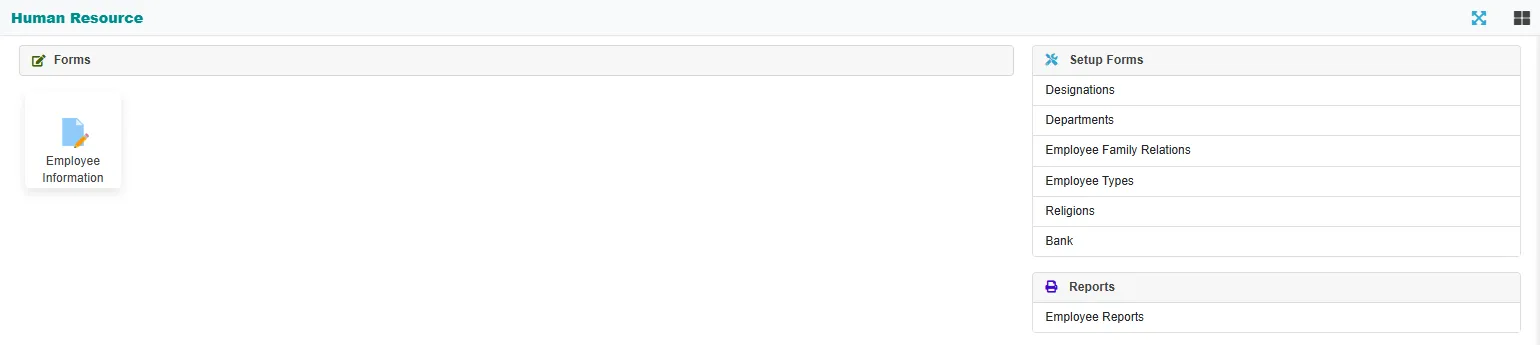
| Group | What is in it |
|---|---|
| Forms | Employee Information: the list of employees and the employee record. See Employees. |
| Setup Forms | Designations, Departments, Employee Family Relations, Employee Types, Religions and Bank. See Human Resources setup lists. |
| Reports | Employee Reports: employee information, employee card, employee list, bank account list, and the department and designation lists. See Employee reports. |
The order to set it up in
- Fill the setup lists: departments, designations, employee types and the banks your employees use.
- In Payroll, set up the allowance types, deduction types and leave types. The employee's pay lines are picked from them.
- Add the employees, with their pay.
- Then run the month in Payroll. See Payroll: how the month's pay is worked out.
Related
- Lists (index pages) and Entering and changing documents explain the buttons every screen shares.