Asset Category
Open Assets Management and click Asset Category.
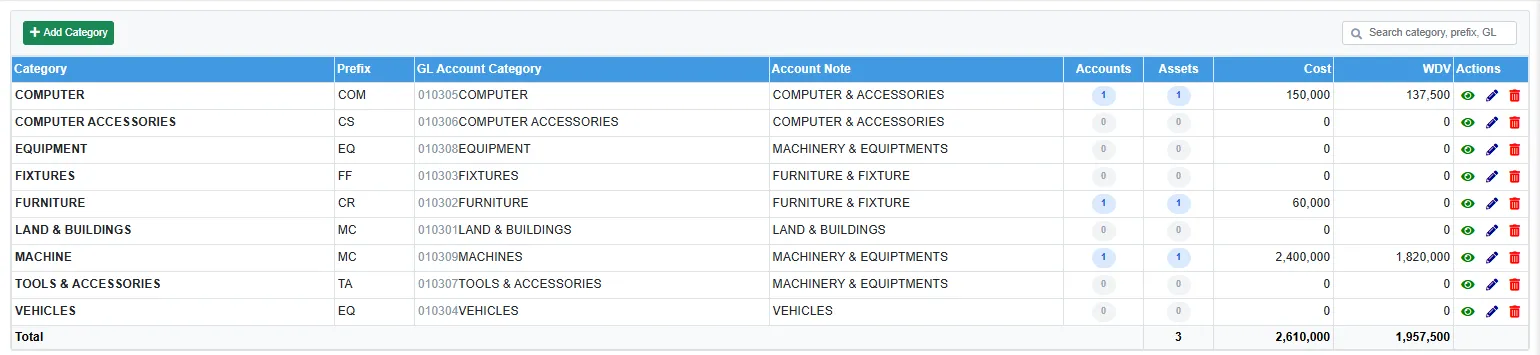
A category groups the assets (for example COMPUTER, MACHINE, VEHICLES) and decides where their GL accounts live. Each row shows the Prefix, the GL Account Category that holds the assets' accounts, the Account Note, how many Accounts and Assets it has, and their Cost and WDV. The last line totals them.
Click Add Category to add one, or Edit on a row.
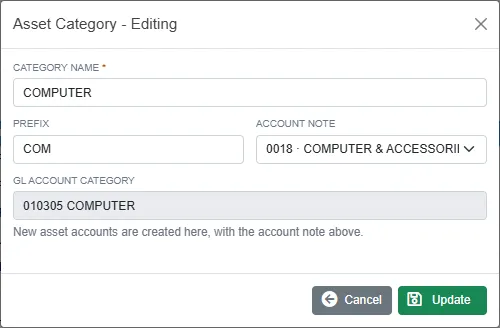
| Field | What it is for |
|---|---|
| Category name | Required. No two categories may have the same name. |
| Prefix | A short code for the category. |
| Account note | The note the category's asset accounts are printed under in the financial statements. It is needed before New on an asset can create an account. See Account notes and categories. |
| GL account category | Made for you when the category is saved, under the fixed-assets group of the chart of accounts. New asset accounts are created here. |
A category that has assets, or whose GL account category still has accounts, cannot be deleted.
Asset Setup
Open Asset Setup.
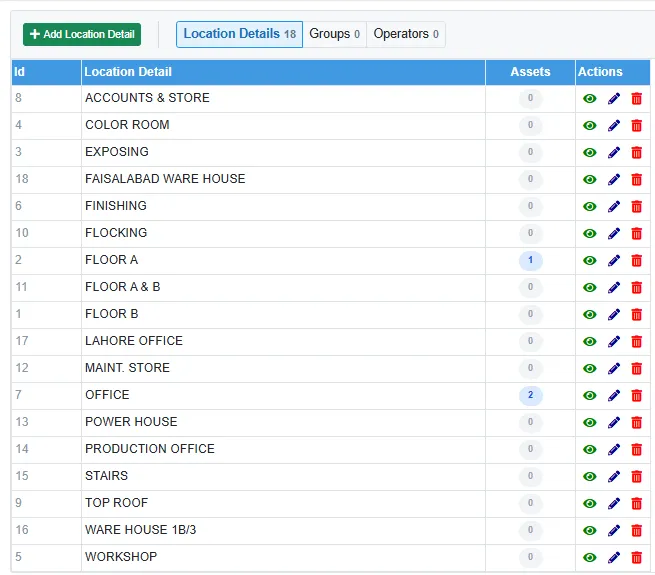
Three short lists, one per tab. The number on each tab is how many rows it has.
| Tab | Used on the asset for |
|---|---|
| Location Details | Location detail (required): where in the site the asset stands, for example OFFICE or FLOOR A. |
| Groups | Group: an extra grouping of your own. Not required. |
| Operators | Operator: the person or team who uses the asset. Not required. |
Click Add (for example Add Location Detail) to add a row, or Edit on a row to rename it. The Assets column counts the assets using each row. A row that an asset uses cannot be deleted, and no two rows on a tab may have the same name.