The disposals list
Open Assets Management and click Asset Disposal.

Each row is one disposal voucher (DPS-…): the date, the asset, its Book Value, the Salvage received, the Gain / (Loss) (a loss in red and brackets) and the account the money was Paid Into. Period chooses the fiscal year shown. The search box finds a voucher, an asset or an account.
Dispose of an asset
Charge the depreciation up to the month before the disposal first. See Monthly depreciation.
- Click the green Dispose Asset.
- Choose the Asset. The list shows every asset not yet disposed, with its book value.
- Type the Disposal date. It cannot be before the purchase date.
- Type the Salvage received: the money you got for it. Enter 0 when it is scrapped and nothing was received.
- For a salvage above 0, choose the cash or bank account it was Paid into.
- The Description is filled for you; change it if you like.
- Check the voucher below and click Save. You get, for example, DPS-131-2627-000001 posted: AST-00003 disposed.
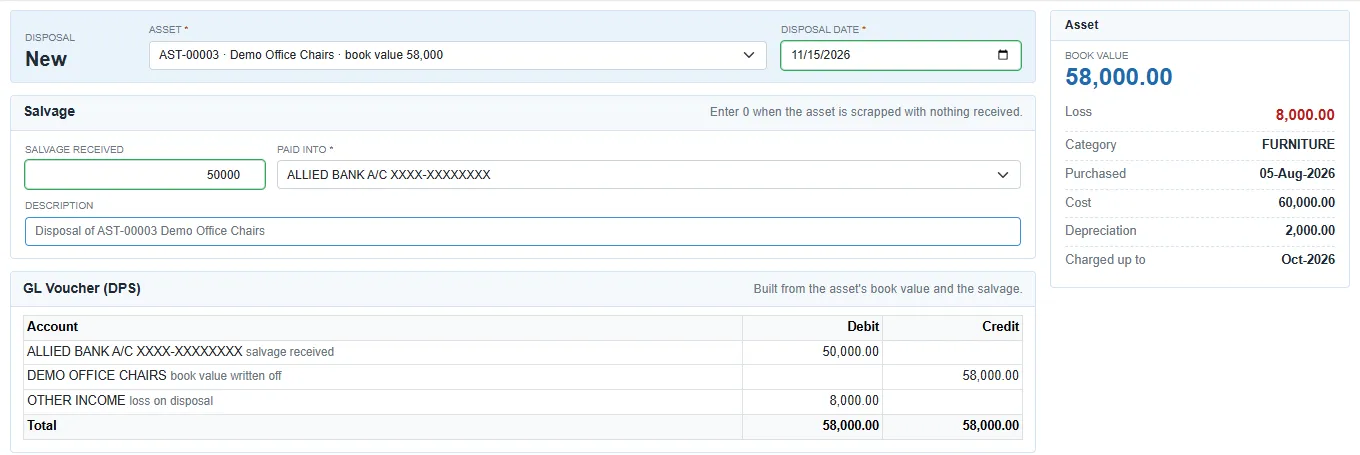
The GL Voucher (DPS) table shows the voucher before it is posted:
| Line | Dr | Cr |
|---|---|---|
| The cash or bank account | The salvage received | |
| The asset's account | Its book value, written off | |
| OTHER INCOME | A loss, when the salvage is less than the book value | A gain, when it is more |
The card on the right shows the book value, the Gain or Loss, the category, purchase date, cost, depreciation and the month Charged up to.
After saving, the asset shows Disposed in the register and the monthly run no longer charges it.
Change or cancel a disposal
- Edit on a row changes the date, the salvage or the account. The voucher is posted again.
- Delete cancels the disposal, after you confirm. The GL voucher is cancelled and the asset goes back to the register: Disposal DPS-… cancelled; AST-… is back in the register.
A disposal in a closed fiscal year cannot be cancelled.