09 — Fixed Assets

Every machine, vehicle and laptop — what it cost, what it's worth today.

The register holds what the business owns and uses for years: its cost, its life, where it is and who uses it. Depreciation is charged month by month, each charge its own ledger voucher, and you see the whole run before anything posts. Sell or scrap an asset and the gain or loss is worked out for you.

What you get

Everything Fixed Assets does for you.

  • One register for machines, vehicles, computers, furniture and buildings, with categories you define
  • Each asset gets its own ledger account, under its category
  • Straight-line depreciation charged monthly; the last month takes whatever is left, so the asset ends at exactly zero
  • Preview every charge still due before you post — months missed are caught up at once, one voucher per month
  • Hold depreciation on an asset when it's out of use
  • Taking over assets from an old system? Enter the depreciation already charged and the register carries on from there
  • Move an item out of stock into the register, and the ledger moves with it
  • Site, location, group and operator on every asset, so you know where it is and who has it
  • Sell or scrap an asset and the disposal voucher works out the gain or loss
  • Asset status and asset statement reports
Form spotlights

The screens that make the difference.

Form spotlight

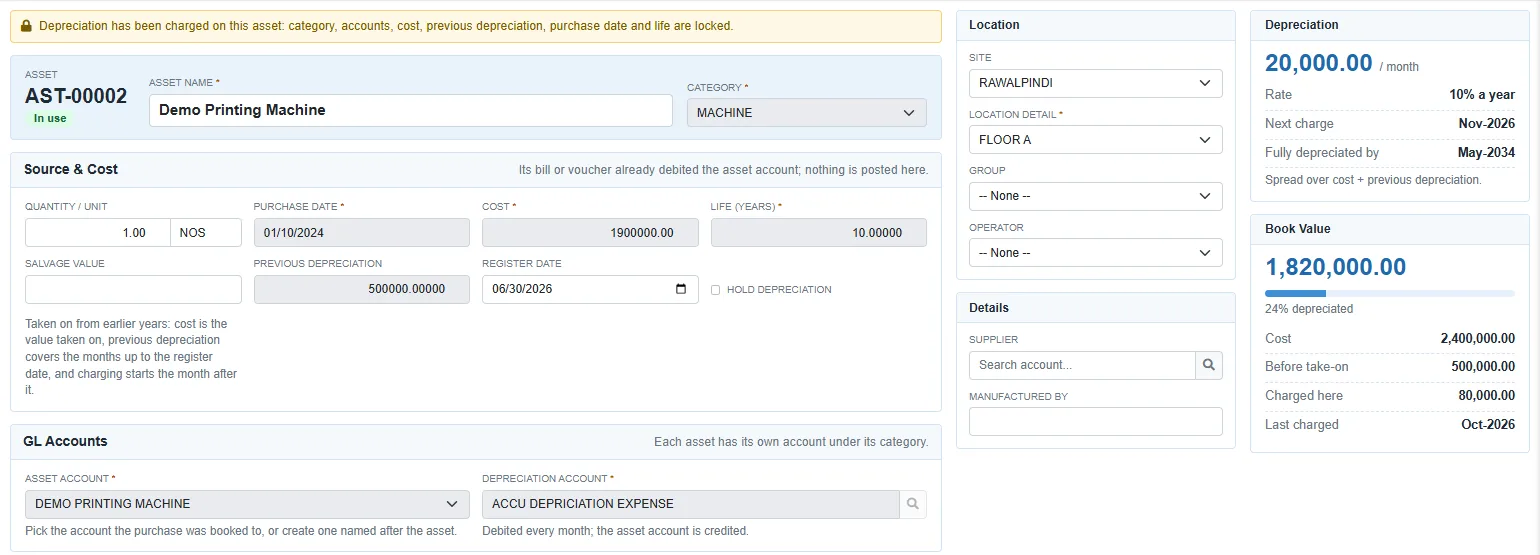
Asset Record

Cost, life, salvage, previous depreciation, its own accounts — and beside them the monthly charge, the next month due, when it'll be fully depreciated and the book value today. Once depreciation has been charged, the fields that drive it lock.

Form spotlight

Depreciation Run

Pick the month, preview every charge still due grouped by category, then post them in one go. The button tells you how many charges and how much before you press it.

See it working with your own numbers.

Bring a month of your real documents to the demo. We will show you the ledger entries they produce, and the reports they land in.