Company
Open User Administration and click Company. The company's record opens straight away for changes.

| Field | What it is for |
|---|---|
| Company Id, Abbrivation | Fixed. They cannot be changed here. |
| Company Name | The name at the top of printed documents and reports. |
| Tag Line | A line printed under the name on the sales bill. Leave it empty for none. |
| GST No, NTN No | The company's sales tax registration and national tax numbers. The GST number prints on the tax reports. |
| Authorized Person | The person who signs documents. The name prints in the signature place of printed documents: receipts, issues and adjustments, purchase orders and bills, quotations, sales orders, delivery challans and sales bills. |
| Authorized Person Desig, Is Display | The signing person's designation. It prints under the name only when Is Display is ticked. |
| Is Company Active | Leave it ticked. |
| Report Header Style, Font Color (RGB), Remarks | Kept from the old layout. The web documents do not use them. |
Company Logo and Company Stamp: click the picture and choose an image (PNG, JPG, BMP or GIF, about 96 × 96 pixels). The logo shows at the top left of every screen and on printed documents. The stamp prints beside the signature on the documents listed above. Remove Logo and Remove Stamp take them off.
Click Update to save, or Cancel to go back to the module page.
Locations
Open Locations.

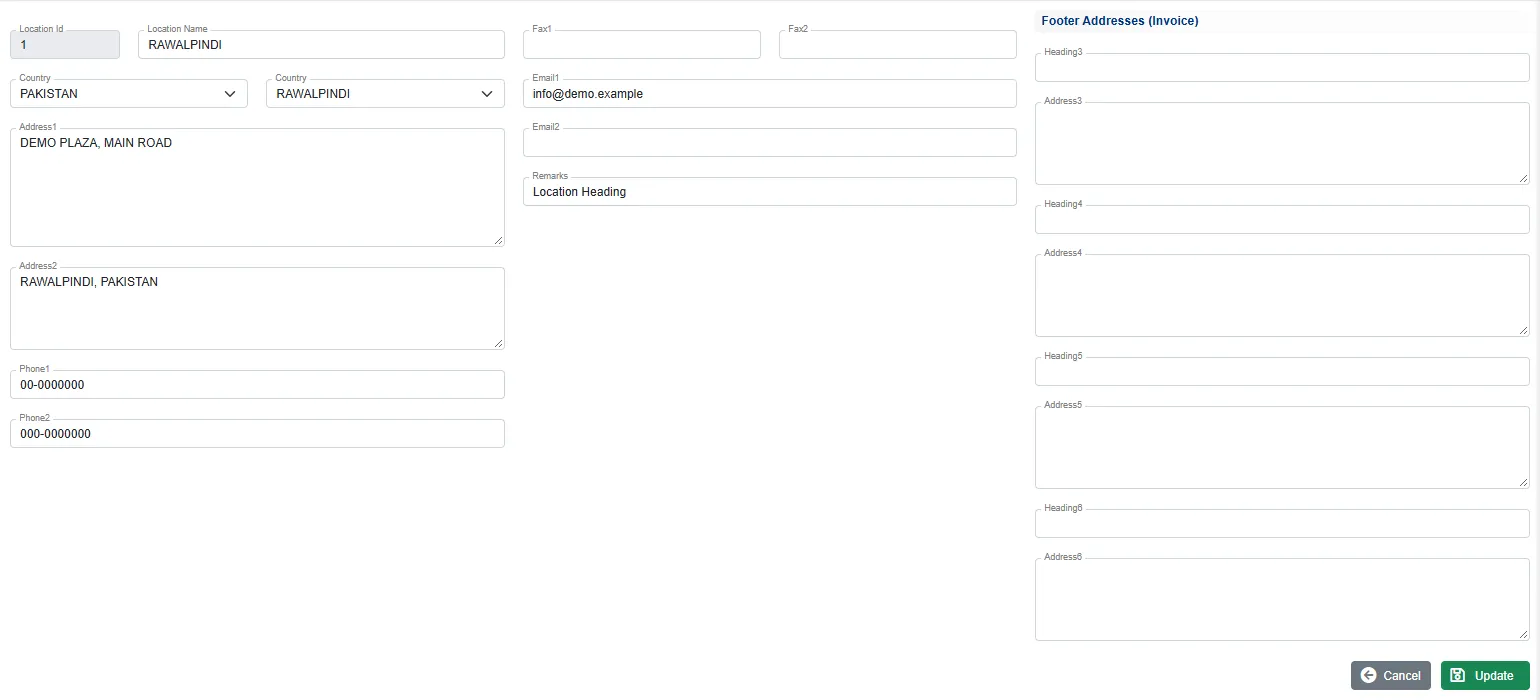
A location is an office or site of the company. Each user and each employee belongs to one, and the stock rooms are kept per location. Click Edit on a row to change it.
| Field | What it is for |
|---|---|
| Location Name | The name shown in the header after login. |
| Country, City | Pick the country, then the city. The second box is the city, although its label also says Country. |
| Address1, Address2, Phone1, Fax1, Email1 | Printed in the header of documents and reports. |
| Phone2, Fax2, Email2, Remarks | Kept for reference. |
| Footer Addresses (Invoice) | Headings and addresses 3 to 6, kept from the old invoice layout. The web documents do not print them. |
Click Update to save. Adding a new location is open only to users with Add permission on Locations. The Admin default role does not include it.
Related
- Administration: what it holds
- Inventory setup lists: stock rooms and their location